


Why does Claude struggle with Outlook on its own?
Outlook connectors already exist, in Claude and elsewhere. They read email just fine. But when it came to preparing a real reply, ready to send, features broke down, and our clients lost the time they expected to save.
Drafts come out without a signature
Microsoft offers no way to read a mailbox’s Outlook signature. Every draft has to be finished by hand, and it gets worse when each mailbox has its own.
Attachments hit a ceiling fast
The simple way to attach a file to a draft is limited to about 3 MB. A PDF quote, drawings, photos: they rarely make it.
One mailbox at a time
Sales, support, billing: in a small business, email lives in several mailboxes, often shared. The AI needs to know which one it is answering from.
So we rebuilt the whole thing from the ground up. Signatures, large files, shared mailboxes: it all works.

What Claude does in your Outlook mailboxes.
The same kind of secure connection we built for a B2B distributor, whose mailbox now feeds a live dashboard. We use it every day, in our own operations and at our clients.
Read and search
In one mailbox or all of them, by sender, subject or date. Claude finds the thread and sums it up.
Prepare drafts
New message, reply or forward, saved in Outlook Drafts, with each mailbox’s own signature.
Attach your files
Files from your computer, up to 150 MB each. Attachments you receive are saved to the folder of your choice.
Several mailboxes, shared ones too
Yours, sales, support. Several companies as well, if you run more than one.
What Claude cannot do.
Every access was audited before delivery. The rule: Claude prepares, you decide.
- Send an email. It prepares drafts; you are the one who clicks Send.
- Open a mailbox you did not choose. Access is limited, on Microsoft’s side, to the mailboxes named at setup.
- Work from another computer. The access key is encrypted by Windows on your machine.
- Take orders from an incoming email. Message content is treated as information, never as an instruction.
- Quietly attach a file for a stranger. It warns you when an external recipient has never received mail from that mailbox.
Three steps, then you get to work.
1A 30-minute call
We look at your mailboxes, what you want to hand off to Claude, and whether it is the right tool for you.
2Guided setup
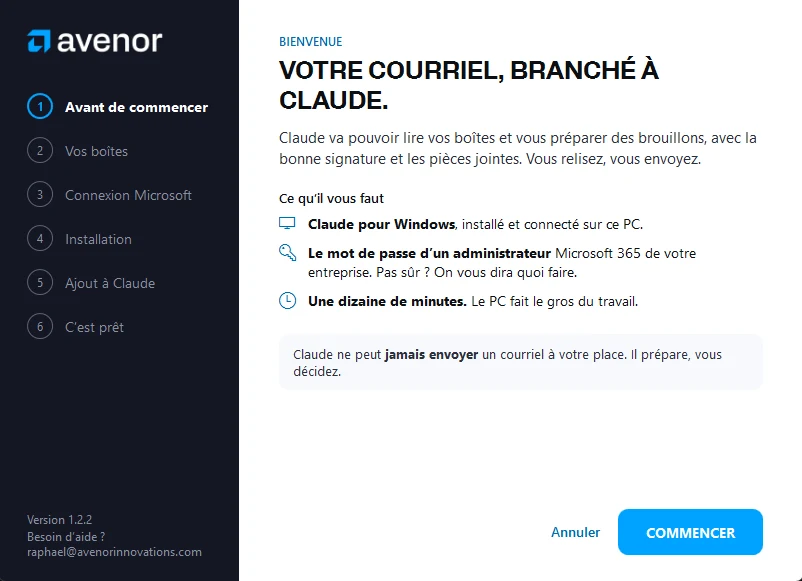
An installer walks you through each screen, in about ten minutes, with your Microsoft 365 administrator account.
3You use it in Claude
“Draft a reply to this client with the quote attached.” The draft is waiting in Outlook.
What people ask us.
Can Claude send emails on my behalf?
No. It prepares drafts in Outlook. Nothing goes out until you have reviewed it and clicked Send.
Which version of Outlook does it work with?
With business Microsoft 365 mailboxes (Exchange Online), in Outlook for Windows, Outlook on the web or on your phone, since the drafts live in the mailbox itself. Setup runs on Windows 10 or 11, with the Claude desktop app.
Does my email go through Avenor’s servers?
No. Your computer talks directly to Microsoft. An email’s content is sent to Claude only when you ask it to read it, as with any conversation with Claude.
Can everything be removed?
Yes, in two steps: uninstall the extension in Claude, and remove the access in Microsoft 365. Everything stops right away.
Can I download it myself?
The tool is reserved for our clients: we want to make sure it fits your situation and support you if needed. Book a call and we will send you the setup link.
Your email deserves better than copy and paste.
Let’s see together whether Claude connected to Outlook would save you time. If not, our free AI diagnostic shows you where to start.